
Using Claude Agent Teams: An Operator's Guide to Hands-Off Development
Micro-releases, self-sufficient tickets, the workflow and the discipline that enabled hands-off execution


Section 1: The Seduction of Scale
I started playing with Claude Agent Teams about 10 days ago. Given my experience with the Agentic Flywheel System (ACFS), I was able to easily spin up 2-3 agents and solve for some tickets. The transition was smooth — the patterns I’d learned from ACFS (breaking work into tickets, coordinating parallel agents) translated directly.
Then I asked myself: Now that I understand this reasonably well, can I get to 5+ agents?
The natural thought was: if I can run 3 agents effectively, why not tackle a bigger surface area of the product? More agents means more parallelization. More parallelization means I can ship faster.
I spent 3 days trying. Claude kept losing itself designing the features. I’d explain the architecture, we’d make decisions, then two hours later we’d be re-explaining the same context. Design churn without progress. I’d answer the same clarifying questions over and over.
The problem wasn’t the agents. The problem was scope.
When you give Claude a large surface area to plan over, it gets lost. Multiple parallel agents working on loosely-coupled features means worry about overlaps, shared assumptions, integration points. Claude couldn’t hold all of it in context.
The key realization: the bottleneck falls back to planning. If the plan is too big, agents can’t execute on it—no matter how many you spin up.
After 3 days, I decided to fall back to my original 0.01 release steps. One meaty feature set per release. Claude doesn’t get confused when you box it this way.
Section 2: The Constraint That Unlocked Scale
After 3 days of struggle, I fell back to my original approach: micro-releases. Instead of 0.01 release cycles, I went tighter—0.005 release cycles. One meaty feature set per release. For example, v0.16a was building the MCP catalog. v0.16b was the next feature set. That’s it.
(side note: I move between v0.16a, v0.16b and v0.17a because I didn’t take some screenshots in v0.17a. The conclusion and message remains the same. At 0.16a/b I built with 3 (+1 director) agents. At 0v0.17a I built with 6 (+1 director agent). Appreciate your patience if this gets confusing because of versioning number)
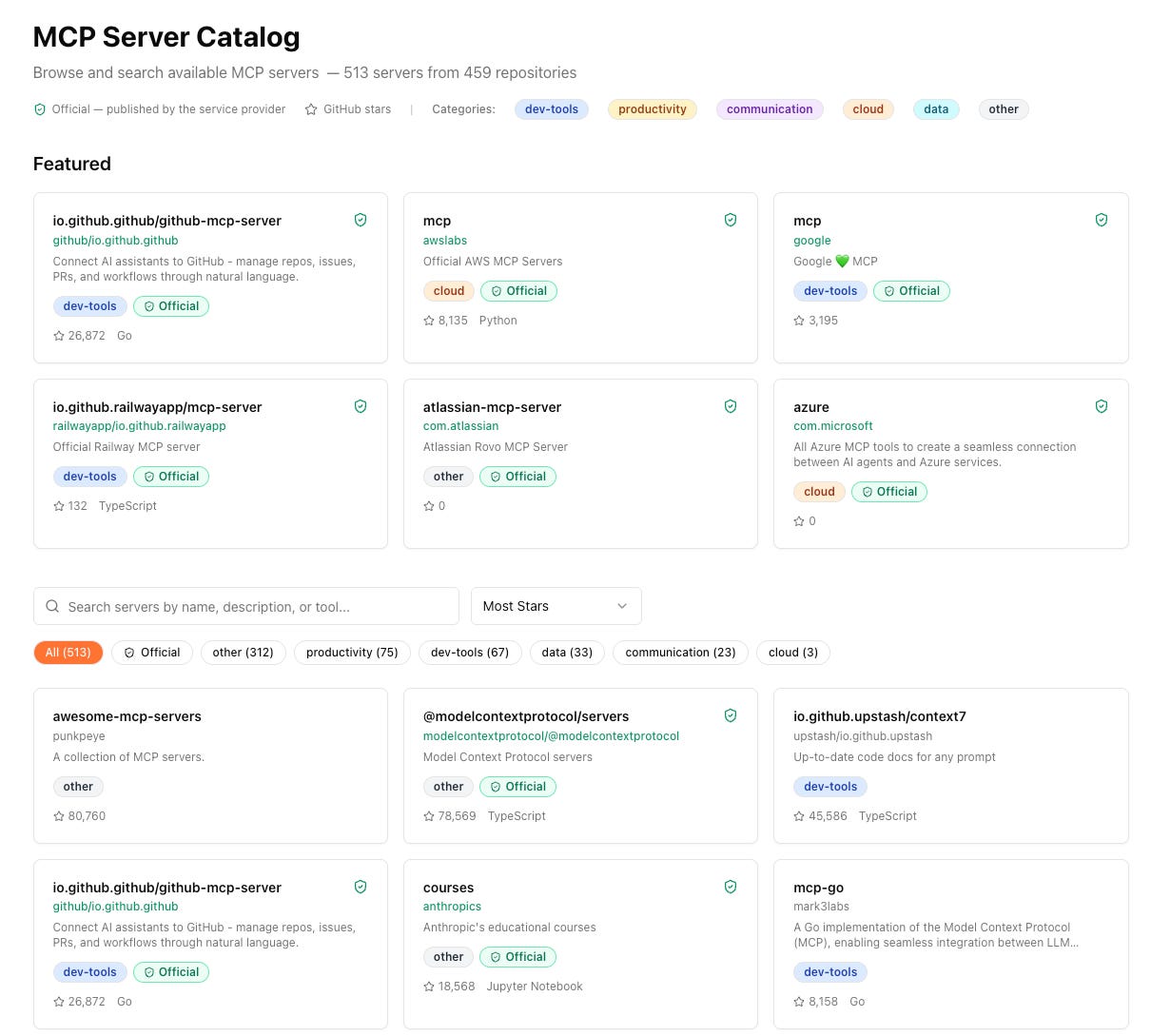
The key insight wasn’t that agents stopped stepping on each other. They still do—you still have to worry about overlaps, shared files, integration points. That problem gets solved at a different level (dependency analysis, execution waves—more on that in the next section).
The real unlock was predictability. When you constrain the scope tightly, generating work becomes predictable. I could review 30 tickets for a micro-release and know: yes, this is on track.
The backlog makes sense. The dependencies are clear.
With a large surface area, I couldn’t even tell if the plan was coherent. Too many moving parts, too many assumptions that might not hold.
Think of this as “(micro-)Sprint on steroids.” Each micro-sprint is hyper-focused. When the box is that tight, you can go deep.
Claude doesn’t lose context because there’s less context to lose.
(side note: Going deep in a feature area is not only possible but a good practice in this new world)
By narrowing scope, I scaled from 3 agents to 6. The math on this release looked like this (that’s because of the scar tissue of the seduction of a bigger plan):
1-3 days: Backlog generation (PLAN.md, thinking through the feature set)
2-3 hours: Ticket breakdown with Beads (make tickets self-sufficient)
2-4 hours: Implementation (hands-off, agents execute)
The constraint didn’t eliminate complexity. It made the complexity manageable.
Section 3: The 6-Step Workflow
Here’s the process I use. I’ve scaled it to 6 agents running completely hands-off on a VPS.
Step 1: Micro-Releases (Scope Boxing)
I covered this in the previous section—0.005 release cycles, one meaty feature set per release (v0.16a = MCP catalog, v0.16b = next feature set). This is the foundation. Everything that follows builds on having a tightly constrained scope.
Step 2: PLAN.md → Beads Tickets
Once PLAN.md is ready (the high-level design for the micro-release), I ask Claude to create Beads tickets.
I’ve written before about Beads as AI-native issue tracking—structured tickets that become AI memory. That insight becomes critical at scale.
With 6 agents working in parallel, self-sufficient tickets aren’t just nice-to-have. They’re the only way to prevent agents from:
Asking you the same question 6 different ways
Losing context when they switch tickets
Breaking each other’s assumptions
This workflow is heavily inspired by Jeffrey Emmanuel’s approach

—using structured issue tracking as the coordination layer for multi-agent work.
Step 3: Make Tickets Self-Sufficient
This is where the real work happens. I iterate with Claude to make each ticket completely self-contained. The test: a new session of Claude should be able to pick up any ticket and have everything required to implement it.
This is the memory of the system. If you get this right, your agents don’t forget.
Each ticket needs:
Clear acceptance criteria
Relevant context (what files to touch, what patterns to follow)
Dependencies (what needs to be done first)
Enough detail that an agent doesn’t need to ask you questions
Example: Before vs After
Before (vague):
joystream-2sd.1.1: Add MCP catalog endpoints
- Create API endpoints for MCP catalog
- Wire up to frontend
After (self-sufficient):
joystream-2sd.1.1: Add MCP catalog list endpoint

Context: Building the MCP catalog feature (v0.17a). This ticket adds
the backend API endpoint that the frontend catalog page will consume.

Acceptance Criteria:

- GET /api/mcp/catalog returns paginated list of MCP servers

- Response schema: { servers: [...], total: number, page: number }

- Supports query params: ?page=1&limit=20&search=github
Files to modify:

- backend/main.py - add route registration

- backend/routes/mcp.py - create new file with endpoint logic

- backend/models/mcp.py - use existing MCPServer model

Dependencies:

- Requires joystream-cxcx (database migration) to be complete

- Blocks joystream-2sd.3.3 (frontend catalog page)

Pattern to follow:

Follow the existing route pattern in backend/routes/skills.py
My contract with the system is Beads.
Claude Agent Teams has its own internal task list for tracking minutiae—I think of it like a secretary keeping track of the details.
But the Beads tickets are ground truth. When agents get confused, they come back to the Beads task list, not to me.
This step takes time. It’s the 2-3 hours in the breakdown phase. But it’s what makes hands-off execution possible.
Step 4: Parallelization Labeling
Once tickets are self-sufficient, I ask Claude to review them and identify what can run in parallel.
The labeling is straightforward: tag tickets with “backend”, “frontend”, “api”, “test”—whatever indicates the domain. This makes it easy to see which tickets have zero code overlap and can safely run simultaneously.
I also experimented with marking tickets by model tier: “Opus|Sonnet|Haiku”.
The idea was to assign straightforward scaffold work to Haiku and complex architectural work to Opus. I’m not sure if this actually worked—the model selection seemed to happen at the agent level, not the ticket level.
It’s on my list as the next experiment to validate.
But the domain labeling (backend/frontend/cli) definitely works. It gives Claude the signal it needs to understand the dependency structure.
Step 5: Determine Team Composition
Now I ask Claude:
Based on this backlog, how many agents are required to effectively parallelize the implementation?
Claude’s first answer: 8 agents. Too many for this release (my judgement).
I asked it to revise with constraints.
Second answer: 4 agents (backend, frontend, CLI, tester). Better.
Then I added two more:
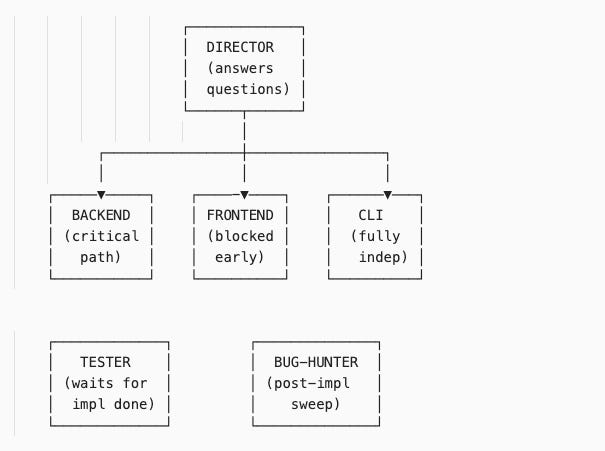
Director agent: Sits above the team, answers questions when agents are blocked
Bug-hunter agent: Runs after implementation waves, sweeps for issues, creates new tickets
Final team: 6 agents.
The structure:
It’s not just about speed.
It’s about different kinds of work happening simultaneously. The backend agent owns the critical path. The CLI agent runs fully independent work. The frontend agent is blocked early, uses that time to study the codebase, then executes when unblocked. The tester waits for implementation to finish, then validates. The bug-hunter does a post-implementation QA sweep.
Step 6: Execution Waves
The final step: I ask Claude to analyze the dependency graph and decide execution waves.
What runs in parallel?
What’s sequential?
What’s blocked?
Claude produces an execution plan showing which tickets can start immediately, which are blocked (and on what), and how many waves of work there are.
Here’s what that looked like for an earlier release (I seemed not have taken the snapshot for this release):
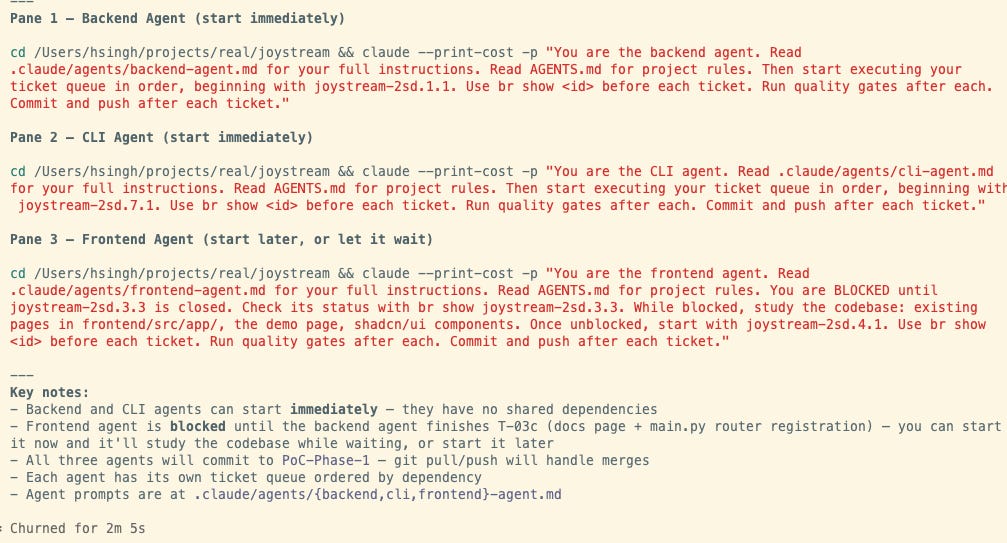
The director agent orchestrates a synchronized start. Each pane shows an agent receiving its mission brief and ticket queue. Backend starts immediately on the critical path. CLI runs fully independent work in parallel. Frontend is blocked early—it will study the codebase while waiting, then execute once backend completes the API registration.
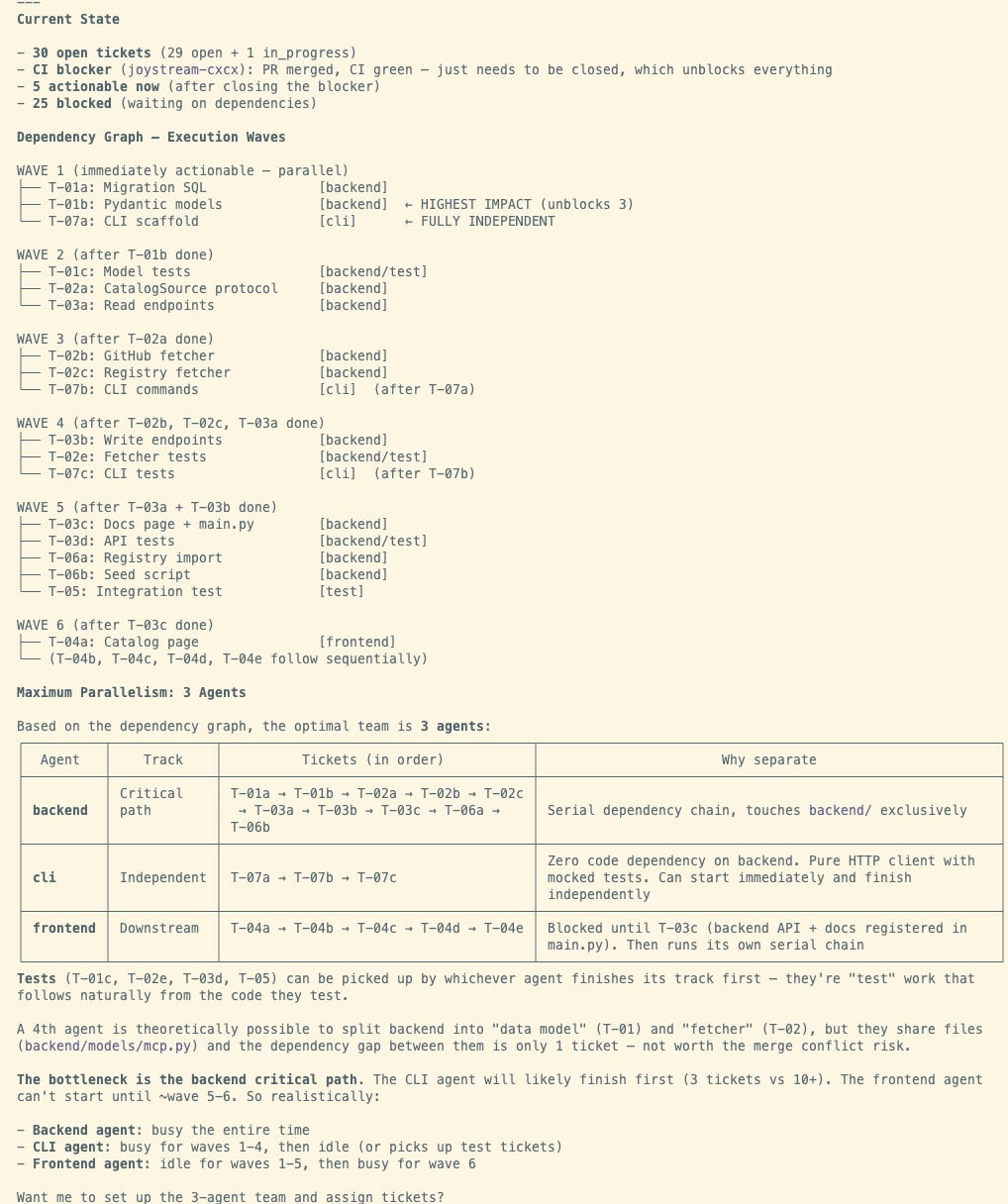
Claude analyzes the 30-ticket backlog:
1 critical blocker blocks everything downstream
5 tickets actionable immediately once blocker clears
25 tickets waiting on dependencies
The dependency graph shows 6 waves. Claude identifies the backend agent’s serial chain as the bottleneck—everything else is either parallel (WAVE 1 tickets run simultaneously), downstream (frontend blocked until ~wave 5-6), or independent (CLI work finishes while others are still working).
The key insight: Claude figures out its own optimal set of agents for the ticket backlog
Claude identified that splitting the backend into “data model” and “fetcher” agents was theoretically possible but risky—they share `backend/models/mcp.py` with only 1 ticket between them in the dependency chain. Not worth the merge conflict risk.
This is what I mean by “solving overlaps at a different level.” The micro-release gives you predictable scope. The dependency analysis tells agents when they can work without stepping on each other.
Section 4: The Execution (Hands-Off Mode)
Once the team structure and execution waves are defined, I hand control to the director agent and walk away.
I run this on a VPS with --dangerously-skip-permissions (more on this in the gotchas section). The director agent sits at the top, fielding questions from the other agents.
When an agent hits a blocker—“Should I use pattern X or Y?”—it asks the director. The director responds based on AGENTS.md context and project rules. The agent unblocks and continues.
This is true hands-off mode. I come back 2-4 hours later.
The result: a built release. The backend agent completed its critical path. The CLI agent finished its independent work. The frontend agent executed once unblocked. The tester validated. The bug-hunter swept for issues.
The Regression Issue
From here on, I will talk about the next release v0.17a
v0.16a & v0.16b flew threw seamlessly. For the v0.17a, I spent 2 days fixing regression bugs after the 2-hour implementation run. Integration bugs slipped through—because Claude changed the implementation of the MCP catalog even though, we weren’t coding it in the release (this was a shocker).
But this wasn’t inherent to the multi-agent approach.
It was because I haven’t been diligent enough about writing tests.
With proper test coverage—backend tests, frontend tests, integration tests—this can be entirely eliminated.
Landing the Plane Protocol
After all agents finish, the landing pattern (from Steve Yegge. Written in AGENTS.md) is:
Run backend tests (linters, type checks, unit tests)
Run frontend tests (ESLint, TypeScript checks, build validation)
Run integration tests (end-to-end flows)
Sync Beads tickets to the central repository (`br sync --flush-only`)
Commit and push
The task list state + git state must stay in sync. Otherwise you lose track of what’s actually done vs what’s committed.
The Math
For v0.17a (with the 3-day struggle and lacking tests):
1-3 days: Backlog generation (including the struggle before I constrained scope)
2-3 hours: Ticket breakdown with Beads
2-4 hours: Implementation (hands-off)
2 days: Regression bug fixes
The ideal math for the next release (with better test coverage):
1 day: Backlog planning
1 day: Implementation (including hands-off execution and landing)
Section 5: Comparison to Agentic Flywheel (ACFS)
Influence & Credit
I’d like to think Claude Agent Teams (I don’t know anybody there — if someone reads this, I’d love to meet you for coffee. I’m a fan) is clearly influenced by Jeffrey Emmanuel’s work. Agent communication patterns like agent naming come from Agent Inbox. But where Jeffrey had to stitch this on top of Claude, Anthropic built it in.
Communication: Hidden vs Visible
With Agent Teams, the communication is completely hidden from you Which is a blessing and a curse. (you can go and tail the log files but they are too complex to make sense; better idea is to ask Claude delegate (director) to give you updates).
It was super cool in Agentic Flywheel to see agents emailing each other. You could watch the coordination happen. In Claude Teams, it just works—automatic message delivery, no inbox management—but you don’t see the wires.
Both systems are hands-off. Just different types of agent-to-agent communication.
Tooling Differences
ACFS has some advantages:
File locking: Prevents agents from stepping on each other’s work (Jeffrey doesn’t like git worktrees, so this was his solution)
Multi-model support: `--cc=2 --cod=2 --gemini=2` = 6 agents across 3 model families. You can mix Claude Code, Codex 5.3, Gemini 3.1. Not locked into one model.
Cockpit view (NTM): See all agent panes, agent inbox, ticket assignments in one interface
Claude Teams advantages:
Easier setup: ACFS takes ~2 days to get right. Claude Teams works out of the box.
Built-in coordination: No stitching required
Lower cognitive overhead: Less to manage
Recommendation
Start with Claude Code and graduate. If you need multi-model support or want the cockpit view, invest the 2 days in ACFS setup. But for most use cases, Claude Teams’ ease-of-use wins.
The Team Abstraction
One thought: Breaking agents into “work teams” (backend team, frontend team, etc.) is a natural way to think. It maps to how we organize human work today.
But does it actually matter in the long run that my agents were in these logical units? I don’t think so.
The coordination happens through the task list and dependency graph, not the team structure itself. The “team” abstraction is for humans to reason about the work, not for the agents.
Section 6: The Real Bottleneck
The bottleneck isn’t implementation time. It’s backlog quality.
If your tickets are self-sufficient—clear acceptance criteria, relevant context, explicit dependencies—agents don’t need you. They read the ticket, understand what to build, and execute.
If your tickets are vague or incomplete, agents get stuck. They ask questions. You become the blocker.
This is why the ticket breakdown phase (Step 3 in the workflow) takes time.
You’re not just creating tickets. You’re creating the distributed memory of the system.
Each ticket is a packet of context that an agent can pick up cold and run with.
The New Ratio for team throughput
The traditional equation is simple:
1 PM supports N engineers.
With agent teams, the equation has three variables:
x PMs : 1 human engineer : z agents
The human engineer becomes the orchestrator. They translate PM requirements into self-sufficient tickets, then manage a fleet of agents executing in parallel.
The more agents you can effectively manage (the higher z), the more PM throughput you can support (the higher x). If I can run 6 agents and deliver a feature in 1-2 days, I can support more product surface area than a traditional 1:1 PM-to-engineer model.
My conviction: we’re moving toward 1-2 PMs per human engineer, with the engineer managing 5-10 agents.
The leverage isn’t in the number of agents alone—it’s in the engineer’s ability to create high-quality backlogs that agents can execute autonomously.
Section 7: Gotchas & Lessons
Tmux Panes Don’t Auto-Start
For a few iterations, I couldn’t get Claude Code to run in independent panes. I’m on iTerm, thought I did things right. I have Tmux on both my Mac and VPS. I figured Claude would automatically start Tmux and I’d see panes like ACFS’s cockpit (NTM) where you start agents and see everything.
It doesn’t. You have to start Tmux FIRST, then start Claude in there. Not a biggie.
No Agent History Tracking
Claude doesn’t keep history of how many agents were used or what they did. I thought for this blog I’d just ask Claude for the information—was disappointed to find it hadn’t tracked this. This is why you see me talk about different release and corresponding images.
As agent teams become more common, this will be a frequent ask.
In ACFS I can go to Agent Inbox and see what tickets were picked up by what agent. Claude Teams doesn’t have this yet.
Running `--dangerously-skip-permissions`
I run this on a VPS because I really wanted to see if I can go hands-off. Don’t do this on your local machine.
This was my first time running it. I have confidence because I use tools from ACFS like `dcg` (destructive command guard)—it acts as a guardrail. Anytime a destructive operation is about to happen, it explicitly denies it.
The director agent handles minor asks and unblocks agents. But the guard prevents disasters. Without it, `--dangerously-skip-permissions` is exactly what it sounds like: dangerous.
Section 8: Conclusion
This post documents using a different harness from ACFS. My muscle improved —I moved from 3-4 agents to 6 agents running hands-off.
In Steve Yegge’s framing of agentic engineering systems, I moved up the scale. Not just in agent count, but in the ability to delegate complex work and walk away.
The Takeaways
Scaling agents requires constraining scope. Micro-releases (0.005 release cycles) make planning predictable. Claude doesn’t get lost when the box is tight.
Self-sufficient tickets are the foundation. They’re the distributed memory of the system. If tickets are good, agents don’t need you.
Hands-off mode is achievable. Director agent + quality backlog + execution waves = you come back 2-4 hours later to a built release.
The bottleneck is backlog generation, not implementation. The new ratio is x PMs : 1 human engineer : z agents. The more agents you can manage, the more PM throughput you can support.
Getting Started: The Progression Path
Don’t start with 6 agents. Start with 2.
Stage 1: Prove the workflow (2 agents)
Pick a small micro-release (~10 tickets)
Backend + Frontend agents (or Backend + CLI if simpler)
Focus on making tickets self-sufficient
Goal: Complete one release hands-off without asking questions
Stage 2: Add specialization (3-4 agents)
Add a Tester agent
Introduce dependency waves (some work blocks other work)
Goal: Agents handle blocked states without your intervention
Stage 3: Scale complexity (5-6 agents)
Add Director agent (you’re no longer the question-answerer)
Add Bug-hunter for post-implementation sweep
Goal: Come back 2-4 hours later to a landed release
When to scale up: When agents stop asking you questions. If you’re still the blocker at 2 agents, adding more won’t help. Fix the backlog quality first.
The Real Unlock
The real unlock wasn’t the 6 agents. It was the discipline: tight scope, self-sufficient tickets, dependency-aware execution.
Get that right, and the agents scale themselves.
Quick Reference: The 6-Step Checklist
Pre-Work (1-3 days):
[ ] Write PLAN.md for micro-release (one meaty feature, 0.005 cycle)
[ ] Ask Claude: “Create Beads tickets from this PLAN.md”
[ ] Iterate on tickets until self-sufficient (test: can cold agent execute?)
Preparation (2-3 hours):
[ ] Label tickets by domain (backend/frontend/cli/test)
[ ] Ask Claude: “How many agents needed to parallelize?”
[ ] Negotiate team size, add director + bug-hunter
[ ] Ask Claude: “Analyze dependency graph, create execution waves”
Execution (2-4 hours, hands-off):
[ ] Start Tmux, spawn agents in separate panes
[ ] Hand control to director agent
[ ] Walk away
Landing:
[ ] Run quality gates (backend tests, frontend tests, integration)
[ ] beads_rust ticket sync`br sync --flush-only`
[ ] commit code
Key Prompts:
“Make this ticket self-sufficient so a new Claude session can execute it”
“Review these tickets and identify what can run in parallel”
“Based on this backlog, how many agents are required?”
“Analyze the dependency graph and create execution waves”
Side note: It took me less time to implement the backlog than having to reformat my markdown because Substack doesn’t support markdown. What a world we live in now!