
From VibeSpec to Fleet: Agent Engineering with Agentic Flywheel
Three agents, four hours, one sprint—what it actually takes to build and run a multi-agent coding system


I. The Problem That Led Me Here
Over the last six weeks, I’ve been posting about my journey with agentic coding. I’m in exploration mode—figuring out what’s actually required to build software now that coding agents like Claude have evolved significantly since December. It became clear to me that the future isn’t single-agent assistance. It’s agent fleets.
I’d read Steve Yegge’s piece on GasTown, which laid out a scale from basic AI assistance to full autonomous development. I realized I was at stage 6—barely. Not in YOLO mode, but aligned with where he was headed. I reached out. He asked me to hold off while bugs settled. There’s a thriving community there, but it’s still early days. Then I came across Jeffrey Emanuel’s work with the Agentic Flywheel System.
What caught my attention wasn’t just the claim of running 31 projects in parallel. It was his thoughtful approach to PM-ing and architecting. This wasn’t YOLO mode. This was a system built for quality code with proper coordination.
I decided to test it on my current project—a real production system I’m calling JoyStream for now. Not a toy app. Not a demo. A system with actual architecture constraints, API integrations, and consequences for getting it wrong.
Three agents. Four hours. They cleared my entire sprint backlog.
What changed wasn’t just the coding speed—that’s been improving for months. What changed was the rapid compression of the PM-to-spec-to-code cycle. The work shifted almost entirely to specification and architecture upfront. Here’s what I learned running my first agent fleet.
II. What Is the Agentic Flywheel System?
The Agentic Flywheel isn’t another AI coding tool. It’s infrastructure for running agent fleets.
Jeffrey’s philosophy mirrors the Unix approach: small, composable tools that pipe together. Instead of one monolithic “AI developer,” you get 20+ specialized utilities that coordinate through well-defined interfaces. Each tool does one thing well. Together, they create a compounding loop.
The Core Loop:
Plan (Beads + bv (beads viewer)) - Graph-aware task management with dependencies; bv provides the terminal UI for viewing and triaging
Coordinate (Agent Mail) - Multi-agent messaging and file reservations
Execute (NTM + Agents) - Terminal orchestration across Claude, Codex, Gemini
Remember (CASS Memory) - Session search and procedural memory
Scan (UBS) - Code quality guardrails before commit
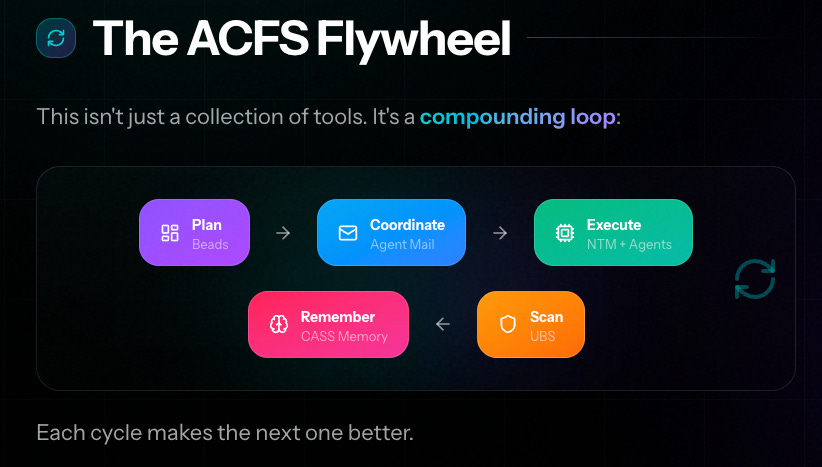
Each cycle improves the next. CASS remembers what worked. Memory distills patterns. UBS catches more issues. Agents coordinate better through Agent Mail.
The system includes 20+ tools beyond the core loop: DCG for pre-execution safety, RU for multi-repo management, SRPS for system protection under agent load, and more. The full stack is documented at agent-flywheel.com/learn.
Where I Am:
I haven’t graduated to using the entire system. Like learning Linux commands, I’ve piped together the four basic core tools—Beads, Agent Mail, NTM, and my agents—and that works well enough. I’ll add others as I get better at this.
The Key Distinction:
This sits between solo Claude Code usage and full autonomous systems like GasTown. With GasTown’s vision, code gets generated and you trust the output. With Agentic Flywheel, you maintain control through heavy upfront specification and coordinated execution. The scale is manageable: 3-20 agents instead of fully autonomous fleets.
I’m staying at this level. The infrastructure supports scaling to dozens of agents, but the real power is in the coordination harness—not just raw agent count.
III. Agent Engineering = Vibe-Specing = Vibe-PMing + Vibe-Architecting
I’ve been calling this shift “Vibe-PMing” and “Vibe-Architecting”—though Andrej Karpathy recently coined “agent engineering,” which is probably the term that’ll stick. They’re the same thing: the new skill of specification work that makes agent fleets possible.
The Bottleneck Has Moved
AI has revealed product management as the new constraint in software development. When Claude can write a thousand lines of correct code in minutes, the blocker isn’t engineering capacity anymore. It’s specification quality.
Traditional PM-to-engineer handoffs had built-in error correction. You’d sketch requirements, engineers would ask clarifying questions, you’d iterate through implementation. Humans are good at filling gaps and making reasonable assumptions.
Agents don’t work that way. They execute what you specify. The work now happens entirely upfront, before any agent touches code.
Multi-Shot Specification: Sense-making Through Iteration
This isn’t one-shot prompting. It’s structured iteration across models to refine intent into executable architecture.
My process:
Start with loose intent - Rough problem statement, no implementation details
Iterate with one model (Claude) - 4-5 rounds of refinement, tightening the specification each time
Take it to another model (Codex) - Fresh perspective catches assumptions and gaps. I found Claude → Codex worked better than adding Gemini to the chain, though that’s worth exploring separately
Return to original model - Synthesize insights, finalize the approach
Generate architecture - Multiple iterations here. Get the structure right
Create Beads tickets - Iterate until each ticket is self-contained and executable without additional context
That last step is critical. Each ticket needs enough detail that an agent can execute independently, without needing clarification or shared context with other agents.
The PM-Architecture Feedback Loop
Working solo on this, I realized something: PM-specing and architecture weren’t sequential phases. They were rapid, interleaved loops feeding each other. A specification question would surface an architecture constraint. An architecture decision would reveal missing product requirements. Back and forth, getting tighter each cycle.
My engineering background helped here. I could push models to justify their design choices, and often they were making suboptimal trade-offs. They’d suggest patterns that looked reasonable but wouldn’t scale, or architectures that created unnecessary coupling. The ability to evaluate those proposals critically—to know when the model was wrong—mattered.
What This Means for Teams
The implication: we’re heading toward a 1:1 or 1:2 PM-to-engineer ratio. Maybe it flips entirely—2-3 PMs for every engineer. The bottleneck is no longer “who can write the code?” It’s “who can think through what needs to be built and specify it clearly enough that agents can execute?”
Why I Didn’t Hit Collisions
I followed Jeffrey Emanuel’s patterns. There’s a reason he’s running 31 projects simultaneously—the coordination infrastructure works when you do the specification work properly. Agents didn’t collide because the upfront Vibe-Specing made collisions impossible.
The shift from “vibe coding” (iterative collaboration with an agent) to “Vibe-Specing” (multi-shot refinement before execution) is where the real work happens now. You’re not just writing tickets. You’re creating an execution environment where agents can operate independently.
This is the new skill.
IV. Installation Reality Check
The Agentic Flywheel System comes with ACFS (Agentic Coding Flywheel System)—an opinionated installer that sets up the full stack. When it works, it’s fantastic. When you hit issues, you’re debugging infrastructure you don’t fully understand yet.
VPS Requirements
You need horsepower. Jeffrey runs this on serious VPS instances because agent fleets consume resources. I went with a mid-tier VPS—enough to run 3-5 agents comfortably. If you’re planning to scale to 10-20 agents, provision accordingly.
The Opinionated Stack
ACFS installs everything: zsh with p10k theme, tmux configuration, git setup, all the flywheel tools. It’s comprehensive. Run the installer and it handles package management, shell configuration, even your terminal aesthetics.
The trade-off: when something breaks, you’re deep in configuration files you didn’t write. I spent time learning zsh after years of bash, reacquainting myself with tmux after a 15-year hiatus since my Sun Microsystems days, and understanding how p10k customizes the prompt.
Time Investment
Plan for 2-3 days from zero to your first successful flywheel run. That includes:
VPS setup and Tailscale configuration
ACFS installation
Learning the shell environment
Understanding tmux session management
Debugging your first agent coordination issues
This isn’t a “install and go” system. It’s infrastructure. You’re building the environment that makes agent fleets possible.
V. The Setup Gauntlet: Getting Agents Coordinated
Getting the tools installed is one thing. Getting them to coordinate is another. Here’s what I learned setting up the core coordination stack.
A. Beads: Task Management as Agent Memory
Beads is git-native issue tracking with dependency graphs. Unlike Jira or Linear, Beads stores everything as git objects. This means agents can read task history, understand dependencies, and coordinate work through the same git operations they already use.
What Beads Does:
Stores issues and tasks as git objects
Tracks dependencies between tickets
Provides structured metadata agents can parse
Terminal and web UI options for viewing and triaging
The Compatibility Decision
I’d been using Beads and was getting comfortable with it. I was specifically using beads_ui—part of the thriving Beads community—which provides a web interface.
Then I saw Jeffrey had created beads_rust, a fork moving in a different direction from the original Beads. This should’ve been simple, but the databases are no longer compatible. He built bv, a terminal UI for beads_rust. It’s nice, but I prefer web UIs.
The original Beads has a beads-sync repo pattern where all tickets sync to a dedicated repository. I loved this. Beads_rust documentation says it supports this, but looking at the codebase, it’s not implemented yet.
For this project, I chose to go the opinionated way: beads_rust and bv. If you want to experience the full system as Jeffrey designed it, this is the path.
The Good News
Coding happens so fast with agent fleets that tickets are like filling a leaky bucket—they empty quickly in micro-versions (0.01, 0.02, 0.03). If I wanted to switch back to the original Beads, I could at any point. The velocity makes tool choices less permanent for a solo developer.
The Robot-Triage Pattern
The key command: bv --robot-triage
This outputs deterministic, parseable ticket data that agents can consume. It handles:
Identifying parallelizable work
Flagging dependencies
Showing what’s ready to execute
Once you have tickets properly structured, --robot-triage becomes the interface between your planning and agent execution.
B. Agent Mail: The Coordination Layer
Agent Mail is what makes multi-agent coordination possible. It’s not just messaging—it’s the coordination protocol.
Why File Locking Alone Isn’t Enough
Git provides some conflict detection, but it’s reactive. By the time git catches a merge conflict, two agents have already done incompatible work. Agent Mail provides proactive coordination through file reservations.
The Three-Layer Protection:
Beads structure - Tasks are decomposed to minimize overlap
File locks - Agents reserve files before editing
Agent Mail - Agents communicate what they’re working on
This triple redundancy meant I never hit file conflicts during execution.
Setup Challenge: The .claude.json Nightmare
This took me 3 days to debug. Agent Mail runs as an MCP server. Claude Code connects to it via HTTP.
Claude Code uses two configuration files:
~/.claude/settings.json - User-editable settings
~/.claude.json - Runtime cache
I updated settings.json with the correct Agent Mail endpoint and bearer token. Restarted Claude. Nothing. The MCP server showed as “failed.”
Debug logs showed Claude was hitting the wrong endpoint. The cache file had stale configuration—wrong URL, wrong token, and the server marked as disabled for my project.
The fix: manually edit .claude.json to match settings.json. Restart Claude. It worked.
Lesson: Always check both config files when debugging MCP connections.
Remote UI Access
Agent Mail has a web UI for viewing messages and agent activity—essential for monitoring what agents are doing. I set up Nginx as a reverse proxy on my Tailscale network so I could access the UI from my Mac while the server ran on the VPS. Nginx injects the bearer token, giving me auth-free browser access while Claude connects directly for low latency. It took me a few iterations to figure this out.
C. NTM: The Cockpit
NTM (New Terminal Multiplexer) is your command center for orchestrating agents. Think of it as tmux with agent-aware features.
Multi-Pane Orchestration
You spawn agents in separate panes, each running different models. With a single command, you can create multiple Claude Code sessions or Codex sessions—each in its own tmux pane. You can watch them all simultaneously, seeing exactly what each agent is doing in real time.
The --pane Option
Here’s the power move: assign agents to specific work using labels.
Beads tickets have labels. Agents filter by label. You’ve just parallelized your workflow across agent specializations.
Why This Matters
Gemini might be better at documentation. Claude excels at backend logic. Codex handles certain patterns well. The --pane option lets you route work to the right model.
I haven’t fully explored this yet—I’m still running primarily Claude. But the infrastructure supports heterogeneous agent fleets, and that’s the direction I’m heading.
D. The Missing Piece: AGENTS.md
Here’s what cost me half a day: I had all the tools installed and configured, but the agents weren’t coordinating properly. The engine wouldn’t fire.
The problem: I was missing the AGENTS.md file with the Agent Specific Flywheel components. Not because of oversight, I had this file in a different directory and was referencing it in AGENTS.md but Claude would not follow the link and read it.
AGENTS.md is the bootstrap protocol that ties everything together. It tells agents:
How to use Agent Mail for coordination
Where to find Beads tickets with bv --robot-triage
What labels they should filter on
File reservation protocols
When to send status updates
Without this ACFS entries, agents don’t know they’re supposed to coordinate. They run independently, unaware of the coordination infrastructure you’ve built.
I had to go through Jeffrey’s projects to understand the right structure. Once I had AGENTS.md in place, everything clicked. Agents registered with Agent Mail, checked for tickets, reserved files, and communicated status.
Critical: The AGENTS.md with ACFS related changes are not optional. It’s the coordination contract.
VI. The Flywheel in Motion: What Actually Happened
Once the infrastructure was in place and AGENTS.md was configured, I spawned my first fleet. Three Claude agents. One project. Here’s what happened.
A. Spawning the Fleet
I started conservative—three agents instead of pushing for higher numbers immediately (I did try with one agent first to run through some tickets).
NTM created three tmux panes, each running a Claude Code session. The agents registered with Agent Mail, pulling whimsical names from the system: BlueLake, GreenCastle, RedStone. The naming is automatic—adjective plus noun combinations.
Watching them register was surreal. These weren’t just terminal sessions. They were coordinated entities with identity, checking in with the coordination server.
B. Execution Observations
Agents Picking Tickets
The first agent checked the robot-triage output, saw available tickets, and sent a message to Agent Mail: “I’m taking backend-auth-123.”
The second agent did the same moments later, picked a different ticket—something marked frontend—and claimed it.
The third agent grabbed documentation work.
No conflicts. No duplication. The coordination layer worked exactly as designed.

Speed
Four hours. That’s how long it took three agents to empty my backlog.
These were real tasks—API endpoint implementation, database schema updates, frontend component work. Not trivial tickets. The kind of work that would’ve taken my old team a full sprint.
The NTM Cockpit
The fact that I could send messages to all agents from a central cockpit was fantastic. No jumping between agent sessions. One command from NTM, broadcast to the fleet.
This changed everything about coordination overhead.
The Forgetting Problem
Agents kept forgetting to update Agent Mail. They’d pick a ticket, start work, and go silent. I’d send a broadcast from NTM: “Hey, update others on email.”
They’d acknowledge, send an update, then forget again ten minutes later.
I’d follow up: “Hey, did you do a review before committing?”
It felt strange at first—talking to agents like they were humans. Jeffrey mentions this too. The language is conversational, not command-line syntax. “Update others” not “execute status_update protocol.”
After the third reminder, I thought: “I want to automate this too.”
That realization hit hard. I’d gone from amazed that agents could coordinate at all to impatient that they needed reminders. The baseline shifted fast.
C. The Emotional Shift
From Fascination to Impatience
Week one: “This is incredible—agents are talking to each other!”
Week two: “Why do I have to keep reminding them to send status updates?”
The trust/action boundary moved quickly. Tasks I was carefully monitoring in the first session became background work by the third session.
Different, Not Better or Worse
Managing agent fleets isn’t like managing human teams. Humans remember context, anticipate problems, and communicate proactively. Agents execute what you specify and forget protocols unless reminded.
It’s not better or worse. It’s different. You trade human intuition for perfect execution of specification. The skill is knowing what to specify and how much supervision the work requires.
Claude Agent Teams: The Pattern Recognition
A number of these patterns have been adopted by Claude Agent Teams. The Delegate pattern—where the starting Claude can send messages to others—is like NTM. Agents exchanging messages mirrors Agent Mail, though you can’t see what they’re saying in human-parseable form. Just verbose logs in agent-specific directories. The internal task distribution resembles Beads, except you have no control over it.
Jeffrey is on the leading edge here. More of his patterns will be picked up by Claude and other agent systems. The Agentic Flywheel is showing what coordinated agent work looks like at scale.
VII. What Works, What Doesn’t
After running the flywheel for two weeks, here’s what I’ve learned about what actually delivers and where the limitations are.
What Genuinely Works
Parallelizable Tasks Execute Simultaneously
When tickets are properly decomposed, agents work in parallel without stepping on each other. Three agents clearing a backlog in four hours isn’t theoretical—it’s what happened. The coordination infrastructure makes this possible.
Agent Mail Prevents File Conflicts
When agents remember to use it, the file reservation system works perfectly. I never hit a merge conflict during execution. The triple-layer protection—Beads structure, file locks, Agent Mail messaging—creates enough redundancy that collisions don’t happen.
Beads Structure Keeps Agents Focused
The robot-triage output gives agents clear direction. They don’t wander or get distracted. They pick a ticket, execute it, move to the next one. The git-native storage means they can see dependencies and respect execution order.
Multi-Model Access Ready
Though I haven’t tried Codex or Gemini yet, the infrastructure supports heterogeneous fleets. You can route different work types to different models. The plumbing is there when I’m ready to use it.
Current Limitations
Heavy Vibe-PM Investment Upfront
You cannot skip the specification work. The multi-shot iteration across models, the architecture refinement, the ticket decomposition—all of that has to happen before you spawn agents. There’s no shortcut here. If you try to hand agents loose specs, they’ll execute them loosely. Although, I think this is feature not a bug.
Agents Forget Coordination Protocols
The forgetting problem is real. Agents need reminders to update Agent Mail, to communicate status, to follow patterns you’ve established. This isn’t a one-time training issue. It’s ongoing supervision.
Beads Sync Challenges Across Tool Versions
The beads versus beads_rust compatibility issue cost me time. If you’re mixing tools from the ecosystem, expect friction. Going fully opinionated—beads_rust and bv—is cleaner, but you lose some flexibility.
Crawl, Walk, Run
I believe fire-and-forget is achievable if your design and tickets are solid. I’ve just crawled—learning the system, staying hands-on. Next is walking—reducing supervision as I get better at specification. Eventually running—full permissions off, agents execute autonomously.
The constraint right now is my skill, not the system. I need more tests built in so the system doesn’t regress without supervision. I’ve already identified a smaller project to try hands-off execution once I have my katas down.
Team Scale: Unknown
I don’t know how this scales across a team yet. My hypothesis: entire subsystems get handed to different developers with no overlap. Each developer runs their own agent fleet on their domain. Coordination happens at the subsystem boundary, not the ticket level.
Making agent fleets work for teams is a skill we’ll learn as base tooling gets better. Right now, the patterns are optimized for solo operators or small teams with clear domain separation.
VIII. Positioning: Where This Fits in the AI Dev Landscape
After running agent fleets for a few weeks, I have a clearer sense of where this approach fits in the broader landscape of AI development tooling.
The AI development tooling landscape has a spectrum. Understanding where the Agentic Flywheel sits helps clarify when to use it—and when something else makes more sense.
The Scale Spectrum
Solo Claude Code → Single agent, iterative collaboration, you’re in the loop for every decision. Good for exploratory work, learning a new domain, or tasks where the specification emerges through conversation.
Agentic Flywheel → Coordinated fleet of 3-20 agents, heavy upfront specification, orchestrated execution. Good for projects with clear architecture where parallelization delivers velocity.
GasTown Full Automation → Autonomous development with minimal human intervention. The vision of “describe what you want, walk away, come back to working software.” Still early, thriving community, but not production-ready for most use cases yet.
Why I’m Staying at Flywheel Scale
The trust gradient matters. I’m comfortable delegating implementation to agents when I’ve done the architecture work. I’m not comfortable delegating architecture decisions—yet. I actually want to know what the system is and what it does so I know where to go fix things.
At Flywheel scale, I maintain control through specification. I decide what gets built, how components integrate, what the boundaries are. Agents execute within those constraints. The coordination harness gives me visibility and intervention points.
GasTown’s vision is compelling, but I’m not ready to trust autonomous architecture decisions on production systems. Maybe that changes as the tooling matures and I see more case studies. Right now, Flywheel hits the right balance between velocity and control.
My Scaling Path
I ran three agents. My next goal is graduating to 5-7, then to 10 agents.
Running 10-20 agents will come at a cost that’s prohibitive for individual developers—though still cheaper than hiring a team of engineers. The API costs add up fast when you’re running multiple Claude sessions simultaneously.
Where Flywheel Will Shine: Open Source Models
This is imminent. When OSS models reach Claude-level quality, the economics change completely. I can decide granularly which agents run on which models, actively managing costs. Frontend work on a cheaper model, critical backend logic on Claude, documentation on the cheapest option that works.
The Flywheel infrastructure supports this already. It’s model-agnostic by design.
The Supervisor Pattern
Another pattern I’m considering: one supervisor agent that reviews outputs from other agents. This gets me out of the loop without going full fire-and-forget. The supervisor checks quality, flags issues, decides when work is ready to merge.
This is the bridge between hands-on orchestration and autonomous execution.
Prediction: This Happens Fast
My bet is all of this happens within 12 months, not 18.
Claude just released Agent Teams. I’m going to blog about my first experience with it next, but the pattern recognition is clear—delegation, messaging, task distribution. The same concepts the Flywheel has been proving out.
When commercial AI platforms adopt these patterns and OSS models reach quality parity, agent fleet development becomes standard tooling for small teams. Solo founders get sprint-level velocity. Small teams multiply their output without hiring.
The constraint shifts from “how many engineers can we afford?” to “how well can we specify what needs to be built?”
Organizations will need people who can do Vibe-PM work—think in systems, decompose cleanly, specify precisely. That’s a different skill than traditional product management, but it’s learnable.
The Agentic Flywheel shows what that future looks like.
References
Agentic Flywheel System: https://agent-flywheel.com/
Steve Yegge’s GasTown: https://steve-yegge.medium.com/welcome-to-gas-town-4f25ee16dd04
Beads (Steve Yegge): https://github.com/steveyegge/beads
Beads Community Tools: https://github.com/steveyegge/beads/blob/main/docs/COMMUNITY_TOOLS.md
Thank you for writing this up.
It was a refreshing to hear this perspective after coming from reading about the approach to the creation of OpenClaw.
Love seeing the diversity of approaches.